App
The Mobile Companion eSIM app
Buy your Japan eSIM, install it, keep an eye on your data and top up when you need more: it all happens in the app, on iPhone and Android, in English or French. And it’s the same account as on the website.
Features
What the eSIM app does
It’s Mobile Companion’s eSIM app for travel: from buying your plan to topping it up, everything happens in one place. The full journey, step by step, is explained separately.
- Check your phoneBefore you buy, the app checks that your phone is eSIM compatible.
- Buy your planChoose your plan for Japan and pay right there in the app.
- Install your eSIMFrom the app, or with your QR code, with help shown on screen.
- Track your dataFollow how much you’ve used, see each eSIM with its status in your eSIM list, and add the app’s widget to your home screen.
- Top upRunning low on data? Choose a top-up and pay in the app, even in the middle of your trip.
- In English or French, whichever you prefer.
- One account: the same one as on the website, so you can switch between the two whenever you like.
Why a travel eSIM app? Because in Japan, between two trains, you want to see the data you have left at a glance, and top up without getting your laptop out.
Your data
See your data at a glance, top up in a few taps
Know where you stand before a long day of sightseeing, and add data when you need it.
See your data at a glance
The app shows how much data you’ve used on your plan, and your eSIM list shows each eSIM with its status. The app also has a home-screen widget you can add.
Top up in a few taps
Running low? Choose a top-up in the app and pay: you can do it from Japan, mid-trip. Prefer the website? You can also top up from your account there.
How much data does a trip use?
It depends on how long you’re staying and what you use your phone for. Our guide explains how much data a trip uses, so you can pick the right plan from the start.
Installation
Install your eSIM from the app
At home, on Wi-Fi, before you leave: installing takes 1 minute.
Buy your plan
In the app or on the website: it’s the same account. Your QR code arrives straight away.
Open your eSIM list
Your eSIM appears there, with its status.
Start the installation
Straight from the app, or with your QR code. The help on screen guides you.
When you land in Japan, turn off aeroplane mode: your eSIM connects to the NTT docomo network by itself. There’s no setting to switch on.
Screenshots
The app, for real
Real screenshots of the app, not mock-ups.
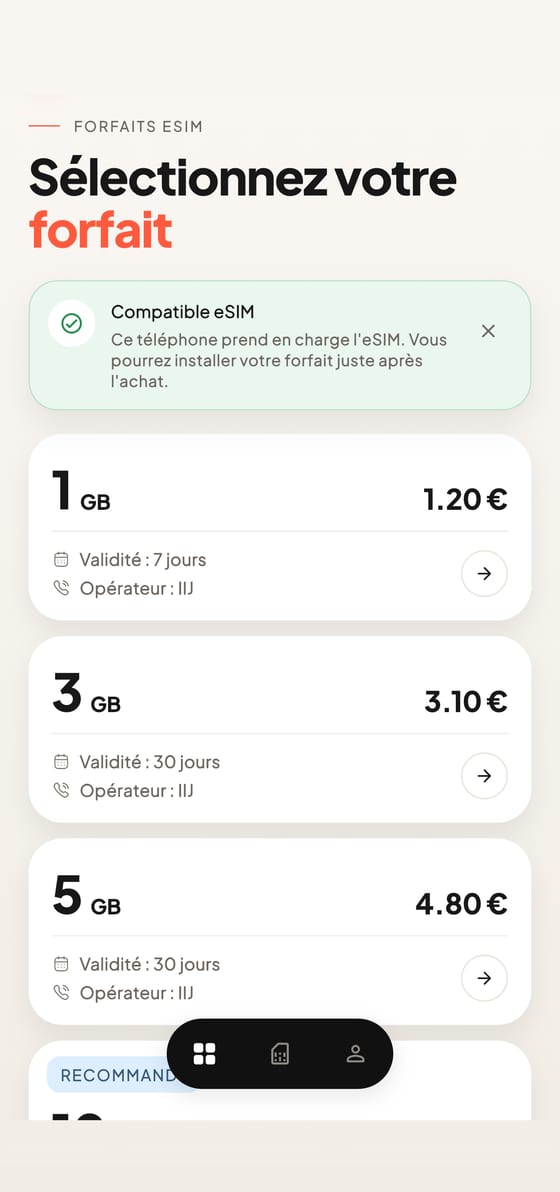
Choose your plan
The app checks that your phone supports eSIM, then you pick your plan.
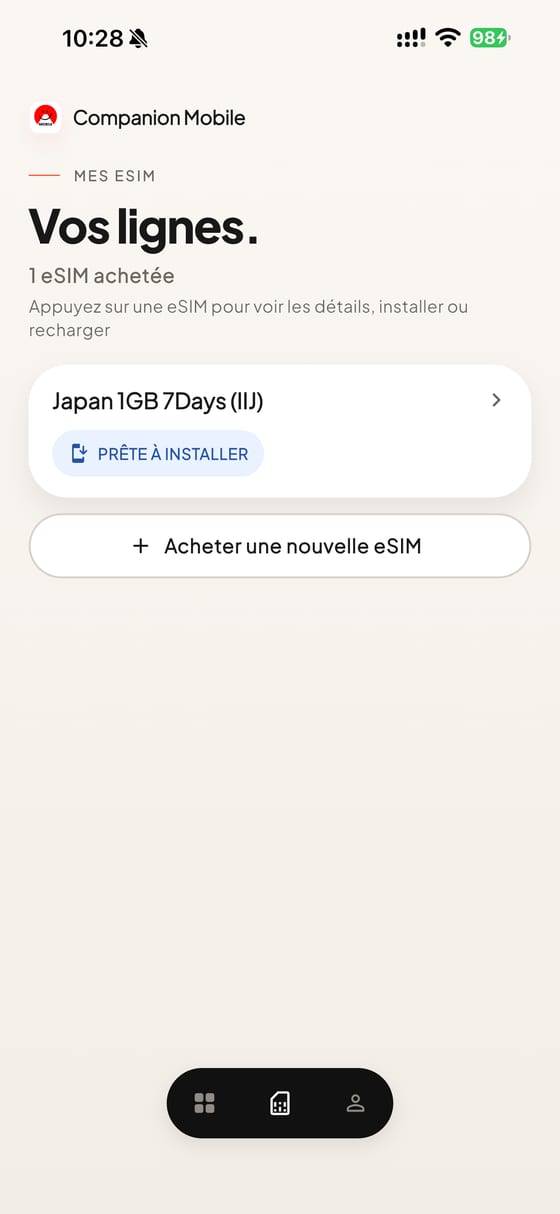
Find your eSIMs
All your lines in one place, with their status.
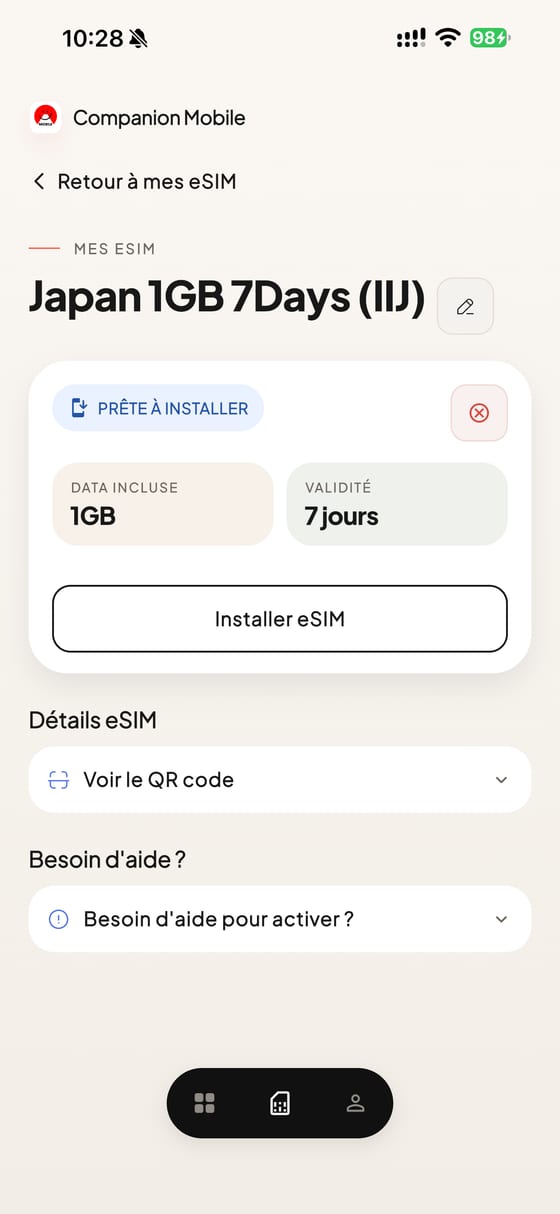
Install it in 1 minute
The install button, the QR code and help are all on your eSIM’s page.


Download
Download the app
On the App Store for iPhone, and on Google Play for Android.
Download the Mobile Companion app
On iPhone and Android, in English and French, with the same account as on the website.


Scan it with your phone
On a computer? Scan the QR code with your phone. Then log in with the same account as on the website.
On the website
Without the app: your account on the website
The app isn’t compulsory. With your account on the website, you can buy and top up too.
| You want to… | In the app | On the website |
|---|---|---|
| Buy a plan | Yes | Yes |
| Check your phone is compatible | Yes, automatically before you buy | Yes, with the list of compatible phones |
| Top up your data | Yes | Yes, from your account |
Switch from one to the other whenever you like: it’s the same account. Handy if you’d rather buy on a computer, calmly, before you leave.
FAQ
Your questions about the app
Do I need the app to use my eSIM?
No. You can buy, install with your QR code and top up from your account on the website. The app makes it easier to follow your data and top up on the go.
Which phones is the app on?
On iPhone, through the App Store, and on Android, through Google Play.
How do I top up my data?
In the app, choose a top-up and pay. You can also top up from your account on the website.
Which languages is the app in?
English and French, whichever you prefer.
Is it the same account as on the website?
Yes: one account, in the app and on the website.
Can I buy my eSIM in the app?
Yes. The app first checks that your phone is eSIM compatible, then you choose your plan and pay.
Does the app have a widget?
Yes, the app has a widget you can add to your home screen.
Where can I get help?
In the help centre on this website, or from support on WhatsApp, 24/7, in English or French. You can also email contact@mobile-companion.com.
Who makes the app?
Mobile Companion, the brand that sells the eSIMs on this website.
More answers are in the app help centre, and you can find out more about the company behind the app. A question right now? Message us on WhatsApp.